You placed an order. The money left your account. Now you wait. Days pass. The excitement of ordering fades into the anxiety of wondering where your package is. You check your email repeatedly. You stare at the order status hoping it will change. It still says processing.
Online shopping in Nigeria has improved significantly. Jumia and Konga deliver to most parts of the country. But the period between clicking pay now and receiving your item remains stressful if you do not know how to monitor the journey.
Tracking your order is not complicated. Both platforms provide tools to follow your package from warehouse to doorstep. Understanding how to use these tools and what the various status messages mean removes the anxiety of not knowing.
Start With the Order Confirmation
Immediately after payment, you receive an order confirmation. This comes as an in-app notification, an email, and sometimes an SMS. Do not delete this. It contains your order number which is the key to all tracking.
Save the order number somewhere accessible. Screenshot it. Write it down. The order number is what customer service will ask for if anything goes wrong. Having it ready saves time and frustration.
The confirmation email also contains an estimated delivery date. This is an estimate, not a guarantee. Most orders arrive within the window. Some arrive earlier. A few arrive later. The estimate gives you a reasonable expectation.
Tracking on Jumia
Jumia provides tracking directly in the app and on their website. The process is straightforward once you know where to look.
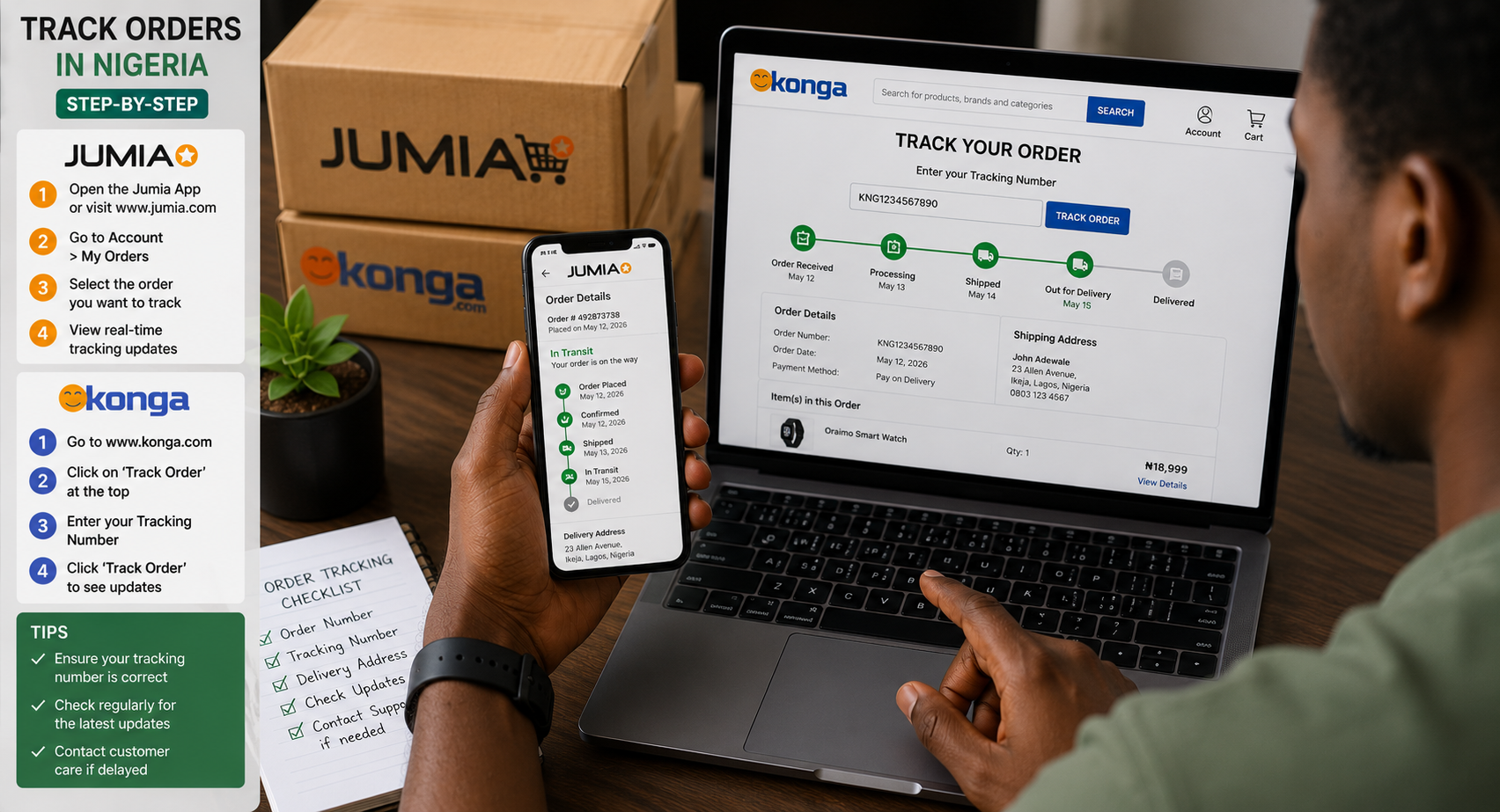
Open the Jumia app. Tap the account icon at the bottom of the screen. Select my orders from the menu. You see a list of everything you have ordered. Tap the specific order you want to track.
The order details page shows the current status. Common statuses and what they actually mean include the following.
Order placed means Jumia has received your order but has not yet processed it. This is the first stage. It typically lasts a few hours.
Processing means the order is being prepared at the warehouse. Items are being picked, packed, and labelled for shipping. Processing usually takes one to two business days.
Shipped means the package has left the warehouse and is with the delivery partner. A tracking number appears at this stage if available. The package is moving toward your delivery address.
Out for delivery means the package is with a delivery agent who is actively delivering orders in your area. This is the day you are most likely to receive your package. Keep your phone nearby. The agent may call to confirm your location.
Delivered means the order has been received. If this status appears but you have not received anything, contact customer service immediately.
Jumia also provides a tracking map on some orders. The map shows the approximate location of your package as it moves through delivery hubs. The map is not live GPS tracking. It updates at handover points between delivery stages.
The Jumia app sends push notifications at each status change. Enable notifications for the Jumia app in your phone settings. You receive updates without manually checking.
Tracking on Konga
Konga tracking follows a similar pattern with slightly different terminology and interface.
Open the Konga app. Tap the account section. Select order history or my orders. Find the specific order and tap for details.
Konga statuses include the following.
Pending means the order has been received and payment is being confirmed. For pay-on-delivery orders, this status indicates the order is awaiting processing.
Confirmed means payment is verified and the order is moving to the warehouse for processing.
Processing means items are being picked and packed.
In transit means the package has left the warehouse and is on its way to your delivery location.
Delivered confirms successful delivery.
Konga provides a tracking link in the order details when the package is in transit. The link opens a page showing the current location of the package and previous tracking events.
Konga also sends SMS updates. Ensure the phone number on your account is correct. SMS updates reach you even without internet access.
Order Status Reference Table
| Jumia Status | Konga Status | What It Means | What to Do |
|---|---|---|---|
| Order placed | Pending | Order received, not yet processed | Wait a few hours |
| Processing | Confirmed / Processing | Items being packed at warehouse | Wait 1-2 business days |
| Shipped | In transit | Package with delivery partner | Monitor tracking updates |
| Out for delivery | In transit | Agent delivering today | Keep phone nearby |
| Delivered | Delivered | Package received | Report if not received |
External Tracking Methods
Both Jumia and Konga use third-party logistics partners for delivery. In some cases, you can track directly through the logistics partner’s platform.
Common logistics partners include GIG Logistics, DHL, FedEx, and local delivery companies. When your order ships, the tracking information sometimes includes the logistics partner’s name and a tracking number.
Copy the tracking number. Visit the logistics partner’s website or use their tracking app. Enter the number. The logistics partner’s tracking is often more detailed than the Jumia or Konga interface. It shows every scan point as the package moves through sorting facilities.
Not all orders provide third-party tracking numbers. When available, this method gives the most granular visibility into your package’s journey.
What to Do When Tracking Shows No Movement
Several days of no status change causes concern. The package seems stuck. Here is what to do.
First, check the estimated delivery date. If the current date is still within the delivery window, the package is likely moving normally without scanning updates. Logistics partners sometimes skip scanning at intermediate points. The package is traveling even if tracking does not show it.
Second, consider weekends and public holidays. Delivery operations slow during these periods. A package that shipped on Friday may not show movement until Tuesday. Patience during weekends prevents unnecessary worry.
Third, contact customer service if the delivery window has passed with no update. Jumia customer service is reachable through the app chat, by phone, and through social media. Konga similarly offers multiple contact channels.
When contacting customer service, provide your order number immediately. Describe the issue clearly. Mention the last tracking update date and the expected delivery date. Specific information gets faster resolution than vague complaints.
Customer service can contact the logistics partner directly. They have access to internal tracking systems that show more detail than customer-facing tracking pages. They can also initiate investigations for packages that appear lost.
What to Do When Tracking Shows Delivered But You Received Nothing
This situation causes panic. The system says delivered. You have no package.
First, check around your property thoroughly. Delivery agents sometimes leave packages with security guards, neighbours, or in safe locations without clear communication. Ask people who might have accepted the delivery on your behalf.
Second, check your phone for missed calls. The delivery agent likely tried to reach you for directions or confirmation. A missed call during delivery hours explains non-delivery.
Third, contact customer service immediately. Report the discrepancy between tracking status and reality. Jumia and Konga investigate these cases. If the logistics partner cannot confirm delivery to the correct recipient, you receive a refund or redelivery.
Time matters for these reports. The sooner you report, the easier it is for the logistics partner to trace what happened to the package. Delayed reporting allows evidence to go cold.
Tips for Smoother Deliveries
A few habits reduce delivery problems.
Use a delivery address where someone is available during business hours. Home addresses are problematic if everyone is at work or school. Office addresses or addresses with security personnel who can receive packages produce more reliable deliveries.
Provide clear directions in your delivery notes. Include landmarks. Mention the colour of your gate or building. Describe what the delivery agent should look for. Detailed notes help agents who may not know your area.
Keep your phone on and audible during the delivery window. The delivery agent will call. A missed call often means a missed delivery and the package returns to the delivery hub for a later attempt.
Respond to delivery agent calls promptly. Confirm your location. Provide guidance if they are close but cannot find the exact address. A two-minute phone conversation saves a full day of delivery delay.
Frequently Asked Questions
How long does delivery typically take in Lagos?
Jumia and Konga typically deliver within one to three business days in Lagos. Some items marked as express arrive within twenty-four hours. Factors like item availability and delivery location within Lagos affect timing.
How long does delivery take outside Lagos?
Major cities like Abuja, Port Harcourt, and Ibadan typically receive deliveries within three to five business days. More remote locations may take seven to fourteen business days. The delivery estimate at checkout accounts for location differences.
Can I change my delivery address after ordering?
Contact customer service immediately if you need to change the address. Changes are possible while the order is still processing. Once the package ships with a label, address changes become difficult or impossible.
What happens if I am not available when the delivery agent arrives?
The agent typically calls you. If unreachable, they may attempt delivery the next business day. After multiple failed attempts, the package returns to the warehouse. You may need to reschedule delivery or pick up from a pickup location.
Can I track my order without the app?
Yes. Both Jumia and Konga allow order tracking through their websites. Log into your account on a browser. Navigate to your orders. The same tracking information is available without the app.
Track Your Current Order Now
Open the app you ordered from. Navigate to your orders. Find the current order. Note the status. Note the estimated delivery date. If the status is out for delivery, keep your phone close.
If the status has not changed in days and the delivery window has passed, contact customer service today. Waiting longer does not resolve the issue. Early action produces faster solutions.
Your package is in the system. It is moving through warehouses and delivery hubs toward your address. Knowing how to follow its journey replaces anxiety with informed patience. Track it. Know where it is. Prepare to receive it. The system works more often than it fails.