I used Canva Free for two years before I paid for anything. During those two years, I designed thumbnails, social media graphics, blog post covers, and simple flyers. Everything looked decent. Not spectacular, but good enough that nobody complained.
Then I tried Canva Pro for a month. The free trial hooked me. Suddenly I had access to features that made my designs look noticeably better with less effort. At the end of the trial, I had to decide whether to pay or return to free.
That decision was not straightforward. Canva Pro costs money. In naira, the monthly subscription is not negligible. I had to determine whether the premium features would generate enough value to justify the cost.
This comparison is based on my experience using both versions as a Nigerian creator making content for social media, blog posts, and occasional client work.
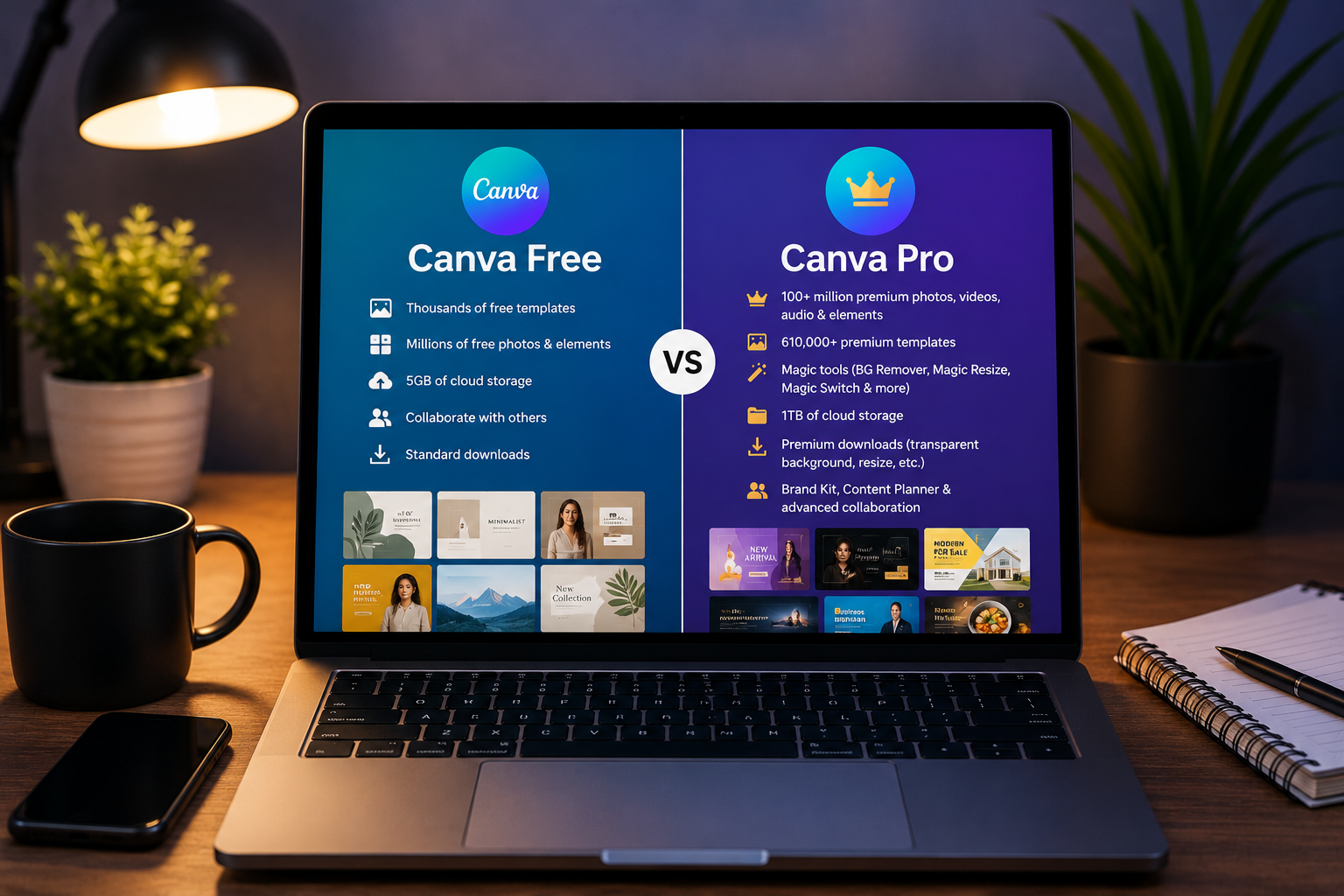
What Canva Free Includes
Canva Free is genuinely useful. It is not a limited demo designed to frustrate you into paying. You can create complete, professional-looking designs without ever paying.
The template library on free is large. Thousands of templates across every category you might need. Social media posts, flyers, presentations, documents, logos. The templates marked as free are fully usable without payment.
The editing tools on free are comprehensive. You can add text, images, shapes, and icons. You can adjust colours, fonts, and positioning. You can upload your own images and incorporate them into designs. The core design functionality is not restricted.
The export options on free include high-resolution PNG and JPG. PDF export is available. These formats cover most needs for digital sharing and printing.
The brand kit on free is limited. You can set a limited number of brand colours. You cannot upload custom fonts. You cannot save your logo for easy access.
Collaboration on free allows sharing designs with others. They can view and comment. They cannot edit alongside you in real time.
The free version contains ads. They appear in the interface while you work. They are not intrusive enough to disrupt workflow but they are present.
Cloud storage on free is five gigabytes. This fills up if you design regularly and upload many images. Once full, you must delete old designs or images to create space.
What Canva Pro Adds
Canva Pro adds features that fall into three categories. More content, more tools, and more convenience.
More content means access to the full template library. Premium templates are marked with a crown icon on free and are locked. On Pro, everything is unlocked. The premium templates tend to be more sophisticated, more varied, and more frequently updated.
More content also means access to the full stock image library. Free includes a decent selection of stock photos. Pro unlocks millions more. The premium stock photos are higher quality and more specific. Finding the right image for a niche topic becomes easier.
More content includes premium icons, illustrations, and design elements. The free selection is good. The premium selection is significantly larger and more polished.
More tools means access to background remover. This feature removes the background from an image with one click. It is surprisingly accurate. For creating product images, headshots, or isolating elements, background remover saves enormous time. On free, backgrounds must be removed manually using other apps.
More tools includes magic resize. This feature takes a design created for one platform and automatically resizes it for another. An Instagram post becomes a Facebook cover, a Twitter header, and a LinkedIn graphic with a few taps. Without this feature, each version must be created separately.
More tools includes brand kit expansion. You can upload custom fonts. You can save your full colour palette. You can save your logo. You can create brand templates that your team can use. For creators who produce content for multiple platforms consistently, the brand kit ensures visual consistency.
More convenience means one hundred gigabytes of cloud storage. This is twenty times the free allocation. Design regularly without storage anxiety.
More convenience means scheduling content directly from Canva to social media platforms. This feature is available in Pro. It reduces the workflow from designing in Canva and posting separately to designing and posting in one flow.
More convenience means the ability to create transparent backgrounds for images and export in SVG format. These features matter for logo design and graphics that need to overlay other content.
What I Actually Use
Not every Pro feature matters equally. Some I use daily. Others I rarely touch.
Background remover is the feature I use most. Almost every design benefits from clean image isolation. Before Pro, I used separate apps to remove backgrounds and imported the result into Canva. The extra steps added time to every design project.
Magic resize is the second most used feature. Creating one design and adapting it for multiple platforms saves me at least an hour weekly. The time savings alone justifies the subscription cost.
The expanded stock library saves time searching for the right image. On free, I often settled for images that were acceptable but not ideal. On Pro, I find images that match my vision more closely.
Custom fonts in the brand kit allow me to maintain visual consistency across all my content. My audience recognizes my content partially through consistent typography.
The features I use less include content scheduling, SVG export, and premium illustrations. These are valuable to some creators but not essential to my workflow.
The Cost in Naira
Canva Pro costs approximately five thousand naira monthly at current exchange rates when paid monthly. The annual plan reduces the monthly cost to about three thousand five hundred naira when paid upfront.
For a Nigerian creator, this is real money. Five thousand naira monthly is sixty thousand naira annually. That amount could buy a decent microphone, a ring light, or cover several months of data.
The question is whether the time saved and quality improved generate more than the subscription cost in value. For me, the answer is yes. The time saved on background removal and resizing alone is worth more than the monthly fee.
Who Should Stay on Free
Not every creator needs Pro. If you design occasionally rather than daily, free is sufficient. The core tools cover basic needs.
If you create designs for one platform only and do not need to resize, free works. Instagram-focused creators who only design feed posts and stories do not benefit significantly from magic resize.
If you have alternative tools for Pro features, free may be enough. Background removal can be done on free websites or apps. Brand consistency can be maintained manually by remembering your colours and fonts.
If your budget is genuinely tight and every naira matters, free is adequate. Upgrade later when income from your content work covers the cost.
Who Should Upgrade to Pro
If you design content daily for multiple platforms, upgrade. The time saved compounds quickly.
If you create content for clients, upgrade. Professional work demands professional tools. The background remover and expanded stock library produce more polished deliverables.
If you are building a personal brand and visual consistency matters, upgrade. The brand kit ensures your content looks cohesive across platforms.
If you currently spend time using multiple apps to achieve what Pro does in one app, upgrade. Consolidating workflow into one tool saves time and mental energy.
The Verdict
Canva Free is the most generous free design tool available. Most Nigerian creators can produce excellent content without paying.
Canva Pro is worth the cost if you design frequently, for multiple platforms, or for clients. The time savings and quality improvements exceed the subscription fee.
Start with free. Use it until you encounter a specific limitation that frustrates you repeatedly. That frustration tells you which Pro feature you need. Upgrade when the value of removing that frustration exceeds the subscription cost.
Frequently Asked Questions
Can I pay for Canva Pro in naira?
Canva bills in dollars. Your bank handles the conversion at whatever exchange rate applies to card transactions. The naira amount fluctuates with exchange rates.
Can I use the free trial without being charged?
Yes. Canva offers a thirty-day free trial of Pro. Cancel before the trial ends and you pay nothing. Set a reminder to cancel if you decide not to continue.
Can I switch back to free after using Pro?
Yes. Your account reverts to free when the subscription ends. Designs created with premium features remain but you cannot edit them using premium elements until resubscribing.
Is Canva Pro worth it for students?
Canva offers special pricing for students through Canva for Education. Check if your institution qualifies. If not, the free version is sufficient for most student needs.
Can multiple people share one Canva Pro account?
Canva Pro allows teams. Adding team members costs extra. Sharing a single login is against Canva terms and risks account suspension.
Decide Based on Your Workflow
Count how many designs you created in the past week. Count how many times you wished for a feature that free did not have. Multiply that frustration by the weeks in a month.
If the result is significant annoyance, upgrade. If the result is barely noticeable, stay free. The right decision is based on your actual usage, not on what other creators do.
I upgraded. It was the right choice for my workflow. Your workflow might be different. Respect your own needs. Choose accordingly.